custom_scaling_policies - V2 Cluster Scaling
Warning
This is for advanced usage and expects understanding of how Spinnaker’s API works.
Enables the ability to define custom Spinnaker Cluster Scaling Policies, as defined by the Spinnaker API. This enables support for multiple scaling policies as well as custom metrics using Provider metrics. Currently, only tested with AWS AutoScaling groups.
There are no defaults set, however, we do have a helper method to lookup the latest
AutoScalingGroupName if the dimension metric value is set to "$self". This is mainly
due to the fact the cluster name in Spinnaker is not known until deployment. In addition, all the
templates are completely configurable if needed. Refer to the documentation section on using
Custom Pipelines
on using a custom templates_path.
Building/Creating custom_scaling_policies
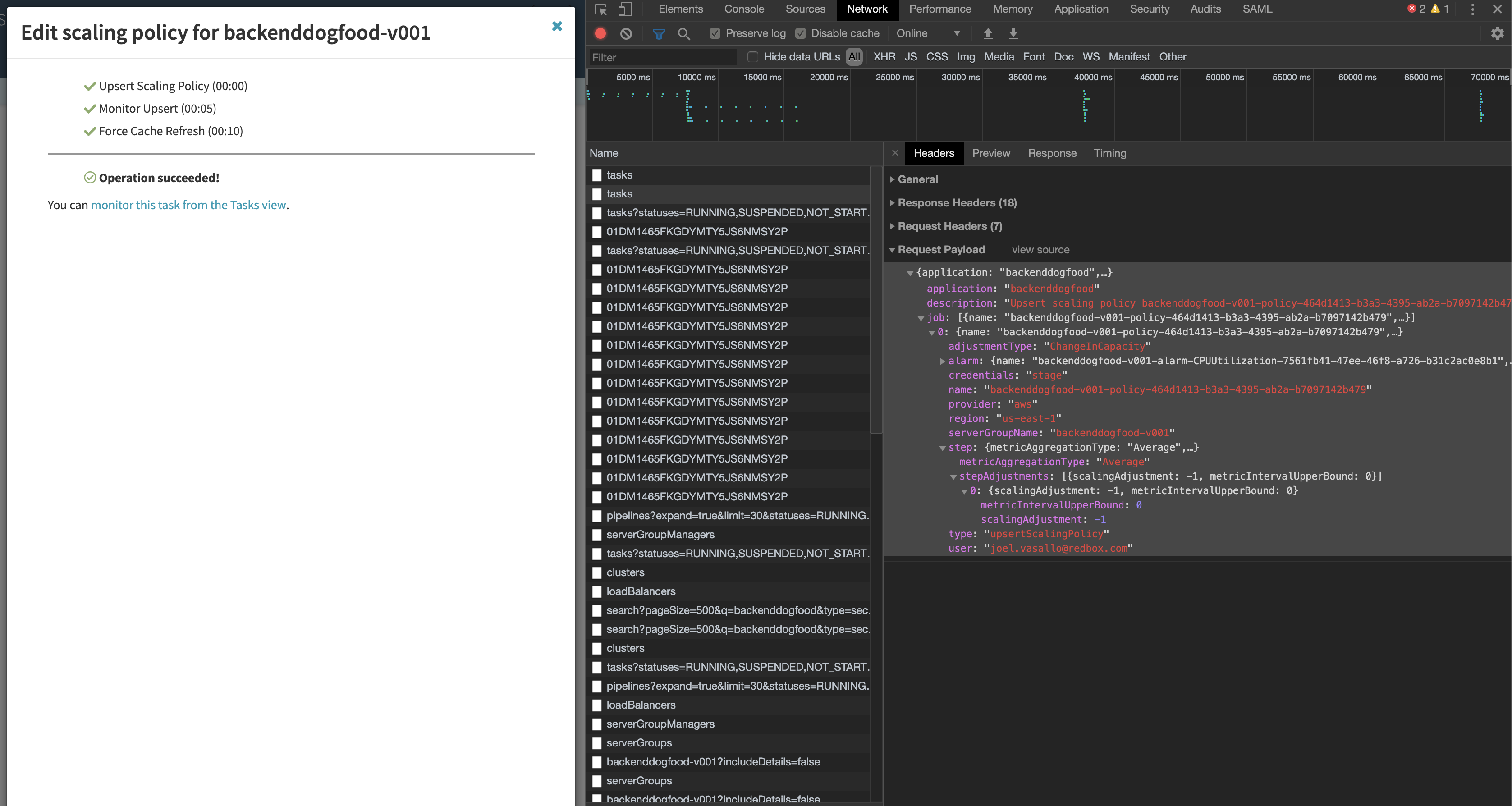
Custom values found below in our short examples and keys can be rather complex. For this reason, we recommend
creating the scaling policies needed via the Spinnaker UI first and watching a browser network tab for the POST
request body to the Spinnaker Gate "/tasks" API. This will contain the payload needed to get the values for
the below usage example.
custom_scaling_policies Examples
This section contains example usage but you are encouraged to modify and build your own scaling
configurations that meet your needs. Keys such as "namespace" and "metric_name" must be metrics
from your provider and Spinnaker must have access to those metrics as well. The most common is AWS Cloudwatch Metrics.
These values are hyper-specific to each end-user so not all keys will be defined in this document.
Note
To facilitate finding the name of cluster names generated by Spinnaker, users can specify a dimensions
referencing "$self" to let Foremast find the custom name
{
   "dimensions": [
      {
            "name": "AutoScalingGroupName",
            "value": "$self"
      }
   ]
}
custom_scaling_policies Simple Step Scaling Example
Note
This policy adds 1 instance between 75-85% CPU, 3 instances between 85-95, and 5 instances over 95% after 3 evaluation_periods of 1 minute.
{
   "custom_scaling_policies": [
      {
         "scaling_type": "step_scaling",
         "instance_warmup": 300,
         "scaling_metric": {
            "metric_name": "CPUUtilization",
            "namespace": "AWS/EC2",
            "comparison_operator": "GreaterThanThreshold",
            "evaluation_periods": 3,
            "evaluation_period": 60,
            "threshold": 75,
            "statistic": "Average",
            "dimensions": [
               {
                     "name": "AutoScalingGroupName",
                     "value": "$self"
               }
            ],
            "steps": [
               {
                  "scalingAdjustment": 1,
                  "metricIntervalUpperBound": 10,
                  "metricIntervalLowerBound": 0
               },
               {
                  "scalingAdjustment": 3,
                  "metricIntervalUpperBound": 20,
                  "metricIntervalLowerBound": 10
               },
               {
                  "scalingAdjustment": 5,
                  "metricIntervalLowerBound": 20
               }
            ]
         },
         "disable_scale_in": false
      }
   ]
}
custom_scaling_policies Multiple Scaling Policies Example
Note
An important consideration when scaling up, is also scaling down.
This policy block scales up a cluster when when CPUUtilization is GreaterThanThreshold of 50% by adding 5 servers.
This policy block also scales down a cluster when CPUUtilization is LessThanThreshold of 25% and removes 1 server.
{
   "custom_scaling_policies": [
      {
         "scaling_type": "step_scaling",
         "instance_warmup": 300,
         "scaling_metric": {
            "metric_name": "CPUUtilization",
            "namespace": "AWS/EC2",
            "comparison_operator": "GreaterThanThreshold",
            "evaluation_periods": 1,
            "evaluation_period": 60,
            "threshold": 50,
            "statistic": "Average",
            "dimensions": [
               {
                     "name": "AutoScalingGroupName",
                     "value": "$self"
               }
            ],
            "steps": [
                 {
                     "scalingAdjustment": 5,
                     "metricIntervalLowerBound": 0
                 }
             ]
         },
         "disable_scale_in": false
      },
      {
         "scaling_type": "step_scaling",
         "instance_warmup": 300,
         "scaling_metric": {
            "metric_name": "CPUUtilization",
            "namespace": "AWS/EC2",
            "comparison_operator": "LessThanThreshold",
            "evaluation_periods": 1,
            "evaluation_period": 300,
            "threshold": 25,
            "statistic": "Average",
            "dimensions": [
               {
                     "name": "AutoScalingGroupName",
                     "value": "$self"
               }
            ],
            "steps": [
                 {
                     "scalingAdjustment": -1,
                     "metricIntervalUpperBound": 0
                 }
             ]
         },
         "disable_scale_in": false
      }
   ]
}
custom_scaling_policies Target Tracking Predefined Metrics Example
Note
{
     "custom_scaling_policies": [
         {
             "scaling_type": "target_tracking",
             "instance_warmup": 180,
             "target_value": 60,
             "scaling_metric": {
                 "metric_type": "predefined",
                 "metric_name": "ASGAverageCPUUtilization"
             },
             "disable_scale_in": false
         }
     ]
custom_scaling_policies Target Tracking Custom Metrics Example
Note
{
     "custom_scaling_policies": [
         {
             "scaling_type": "target_tracking",
             "instance_warmup": 180,
             "target_value": 60,
             "scaling_metric": {
                 "metric_type": "predefined",
                 "metric_name": "ASGAverageCPUUtilization"
             },
             "disable_scale_in": false
         }
     ]
custom_scaling_policies Keys
scaling_type
Scaling Policy Type to use
Type: stringOptions:
"step_scaling""target_tracking"
instance_warmup
Time period to wait before collecting metrics from cluster
Type: intDefault: 300Units: seconds
disable_scale_in
You can disable the scale-in portion of a target tracking scaling policy. This feature provides you with the flexibility to scale in your Auto Scaling group using a different method. For example, you can use a different scaling policy type for scale in while using a target tracking scaling policy for scale out.
Policy:"target_tracking"Type: booleanDefault:false
scaling_metric Keys
metric_type
Note
Only used with
"scaling_type"policies that are of typetarget_tracking.Specify the type of metric to use for evaluation:
"custom"or"predefined"If leveraging predefined metrics, ensure the name of the metric is supported via AWS Predefined Metric Spec (or via Spinnaker UI) such as: EC2 Predefined Metric Spec
Type: stringDefault:NoneExample Options:
"predefined""custom"
namespace
A namespace within a given provider to search metrics within.
Type: stringDefault:NoneExample Options:
"AWS/EC2""AWS/SQS"
metric_name
A Metric Name to search a given provider for. If
metric_typeis"predefined"for target tracking, ensure the name of the metric is supported via AWS Predefined Metric Spec API such as EC2 Predefined Metric SpecType: stringDefault:NoneExample Options:
"CPUUtilization""NetworkIn""NetworkOut""DiskReadBytes"
statistic
Statistic to calculate at the period to determine if threshold was met
Type: stringDefault:NoneExample Options:
"Average""Maximum""Minimum""Sum"
evaluation_periods
Count of evaluation periods to evalutate/check metrics (i.e.
Averageof 3evaluation_periodsevery 30 secondevaluation_period)Type: int
evaluation_period
Time period in between metrics evaluations
Type: intUnits: seconds
comparison_operator
Comparison operator to perform against
thresholdType: stringDefault:NoneExample Options:
"GreaterThanThreshold""LessThanThreshold"
dimensions
Metric limitations such as specific metric values (such as AutoScalingGroupName, SQSQueueName, etc)
If a dimension name
"AutoScalingGroupName"is provided and the value is equal to"$self"Foremast will autodefine the current deployment.Type: List of ObjectsDefault:NoneExample Options:{ "dimensions": [ { "name": "AutoScalingGroupName", "value": "$self" } ] }
steps
Steps to perform based on baseline
thresholdType: List of ObjectsDefault:NoneExample Options:Simple Scaling Bound
Note
Negative scalingAdjustment denote a removal operation.
{
   "steps": [
         {
            "scalingAdjustment": -1,
            "metricIntervalUpperBound": 0
         }
      ]
}
Complex Upper and Lower Bound Range Step
Note
metricIntervalUpperBoundandmetricIntervalLowerBoundare compounded on the thresholdI.E. do a step bound of 60-75% with a base"threshold"of 50 would have a"metricIntervalLowerBound"of 0 (50+10=60) and “metricIntervalUpperBound” of 20 (50+25=75)){ "steps": [ { "scalingAdjustment": 3, "metricIntervalUpperBound": 25, "metricIntervalLowerBound": 10 } ] }